Detailed product reference.
Setup, clinical workflows, backups, recovery, migration and troubleshooting for PsyEntry 1.0.
Before you begin
PsyEntry keeps clinical records in a local encrypted vault. There is no account to create, server to sign in to, or service copy available for recovery. Prepare the Mac and a backup location before putting a real caseload into it.
What you need
What PsyEntry is not
It is documentation software. It does not diagnose, treat, monitor or respond, and it is not an emergency or crisis service. It does not do billing, insurance claims, telehealth, transcription, digital signatures or consent-document management. If a workflow you rely on is in that list, keep the system you use for it — PsyEntry is designed to sit beside those, not replace them.
Create a test vault with invented data. Complete the setup, backup and restore workflows before creating the vault that will hold real records.
Creating your vault
First launch walks you through creating the encrypted vault. Two secrets come out of it, they do different jobs, and neither can be recovered by anyone but you.
- Install and launchUse only a public PsyEntry Store listing or verified download link. On Mac, launch from Applications rather than a mounted image. Do not bypass Gatekeeper, SmartScreen, signature, or publisher warnings.
- Choose a vault passwordThis unlocks the vault on this computer. It is stretched with PBKDF2-HMAC-SHA256 over 600,000 iterations against a salt unique to your vault, and the result wraps a randomly generated master key. The password itself is never stored.
- Write down the recovery phrasePsyEntry shows you a phrase and requires you to transcribe it back before setup will finish. The phrase is a second, independent wrap of the same master key. Only the fact that you confirmed it is saved — the phrase itself never is.
- Confirm, then you are inNormal Back and window-close actions are blocked until confirmation is complete. Once it is, the vault opens on the practice overview.
The unconfirmed phrase is discarded. The next time you unlock with your password, PsyEntry replaces the unconfirmed wrap and shows you a new phrase to confirm — which means any phrase you half-wrote-down before the interruption is already invalid. Write down the new one.
Which secret does what
The workspace
The sidebar lists the app’s main areas. Workspace is where you do clinical work; Manage is where you look after the vault itself. The two actions pinned to the bottom — exporting the audit log and locking — are deliberately always within reach.
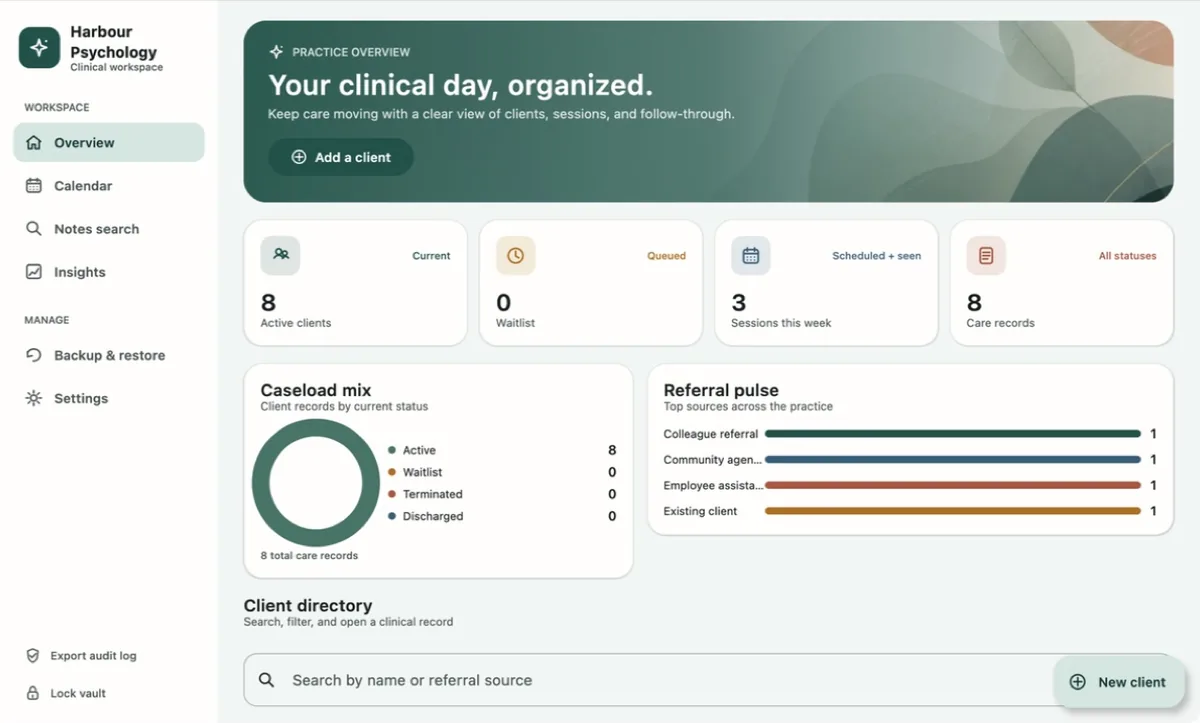
The overview after a handful of records exist. Every figure on this screen is counted from what you entered.
Adding a client
A client record is the anchor everything else hangs from — appointments, notes, plans, intake, assessments and releases all attach to one. Create it before the first session rather than during it.
- Start a new clientFrom the overview, use Add a client in the banner or New client beside the directory search.
- Enter identifying detailsNames and contact details are encrypted with AES-256-GCM before they touch the disk. Enter only what you actually need for the record.
- Record the referral sourceThis is what feeds the referral figures later. Pick the same wording every time for a given source — the insights screen counts strings, it does not guess that two spellings mean the same thing.
- Set the record statusActive, Waitlist, Terminated or Discharged. The caseload mix on the overview is simply a count of these, and status drives which records appear in coverage figures.
Client and settings forms are not clinical notes, so they do not silently write revisions. If you try to navigate away, cancel, lock, or close the window with unsaved changes, PsyEntry stops and asks. Values only become the clean baseline once they are durably stored.
Scheduling sessions
The calendar exists to close a loop: an appointment is not finished when it happens, it is finished when it has an outcome and a note. Both states are visible from the month view.
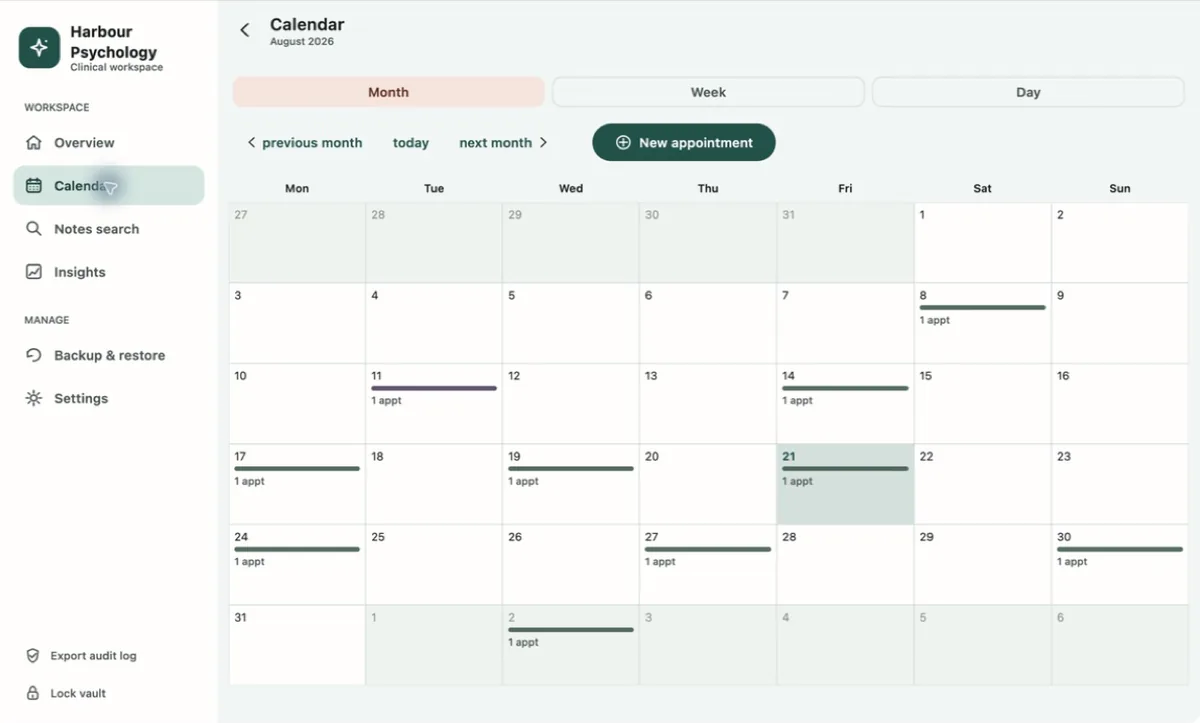
Working in the calendar
- Month, Week and Day switch the granularity. Your choice is written to local settings before the display changes, so PsyEntry reopens where you left it.
- New appointment creates a slot; attach it to a client so the session can later be linked to a note.
- Record an outcome — attended, no-show or cancelled — once the session has happened. Until you do, that session is excluded from every attendance figure rather than being guessed at.
- Open an appointment that already has a note and PsyEntry tells you so, instead of quietly starting a second record for the same hour.
Writing a note
Eight structured templates ship with PsyEntry, including SOAP, DAP, BIRP and GIRP. Whichever you pick, the note is organised the same way: Context gathers the structured facts, Narrative is where you write, and Review is the last look before the record becomes immutable.
The three stages
How drafts are saved
Edits autosave as resumable, encrypted drafts — only changed snapshots are written, so a note you are part-way through survives a restart, a crash or a lock. Active drafts are flushed before the vault locks and before a desktop window closes. Close and navigation actions are guarded, so you are asked rather than losing work silently.
Security-triggered locks lock immediately and do not write an immutable clinical revision as a side effect of autosaving. Finalization stays something you do deliberately.
Advisory prompts in the note stay advisory. Nothing in the workflow converts a suggestion into a clinical claim you did not make, and an empty structured context is omitted from the stored note body entirely rather than being padded with blanks.
Session Mode
Progress-note drafts open with a low-distraction capture pane meant for use while the hour is still running: one plain field for brief observations, client statements and follow-up cues, with goals, quick interventions and a risk glance underneath.
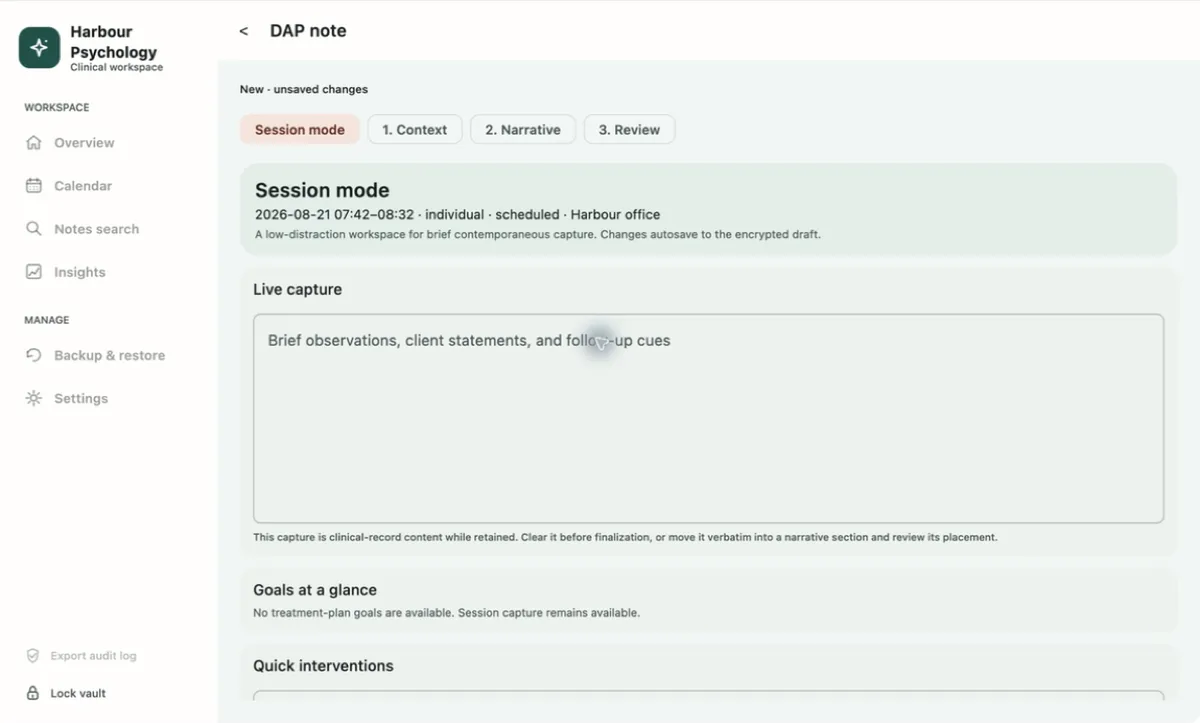
- Capture as you goType into Live capture. Changes autosave to the encrypted draft, so the pane is safe to leave open across a lock or a restart.
- Use the quick controlsGoals at a glance pulls from the active treatment plan; quick interventions and the risk glance let you mark the essentials without leaving the pane.
- Move the capture, verbatimWhen the session ends, choose which narrative section the capture belongs in. PsyEntry moves the text across unchanged — it never places it for you or rewrites it.
- Or clear itIf the capture was scratch, clear it explicitly. Doing so before finalization is the only way it leaves the record.
The app says so on the screen, and it means it. Anything still sitting in the capture field when you finalize becomes part of the record. Move it into a section or clear it — deciding not to decide is a decision.
Finalizing and addenda
Finalizing is explicit and one-way. It stamps the revision with a timestamp and a hash of its own body, links it into the vault’s hash chain, and hands enforcement to the database: SQLite triggers reject updates and deletes against finalized note revisions, audit rows and plan history during normal operation.
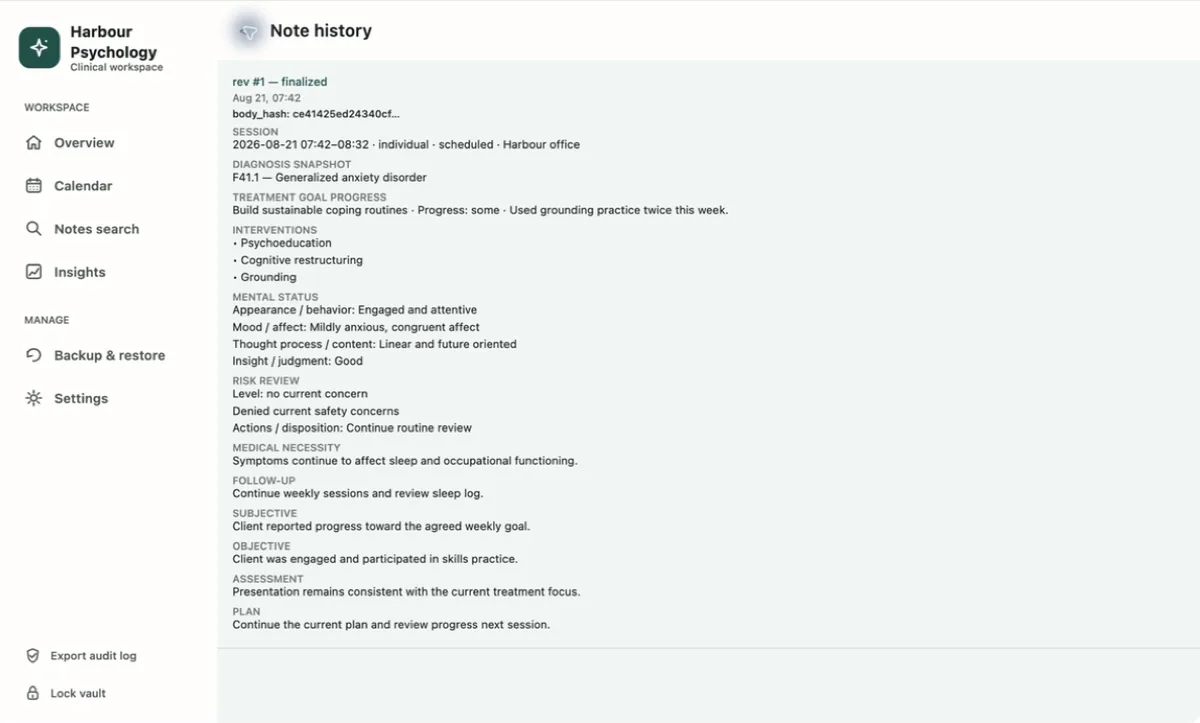
A finalized DAP revision. The body_hash under the revision header is what the chain verifies.
Correcting a finalized note
You do not edit it. You append an addendum, which becomes the next revision and carries the previous revision’s hash forward. Note history shows every revision in order, so a reviewer sees the original entry, the correction, and the fact that the correction came later — which is the whole point.
It proves the record has not been altered since it was written into this vault. It does not prove who wrote it to a third party the way a cryptographic signature would, and PsyEntry does not claim otherwise.
Assessments
Four instruments are enabled for administration: PHQ-9, GAD-7, PCL-5 and C-SSRS. They are scored locally using their documented rules, and results attach to the client record so a trend is visible over time.
- PsyEntry 1.0 enables only the four assessments listed above. WHO-5 and OQ-45.2 remain disabled until the required commercial or electronic permissions are in place.
- A previously paraphrased ACE form was withdrawn rather than shipped as an approximation of the real instrument.
- C-SSRS includes triage points, so reaching one prompts the safety-plan workflow inside the record instead of leaving escalation to memory.
A total is a number the instrument produced from what was answered. PsyEntry presents severity bands as each instrument defines them and stops there — it does not interpret, diagnose, or recommend.
Treatment and safety plans
Plans are revisioned, not overwritten. The screen tells you which revision you are on and what saving will do — saving appends the next revision and the current one stays preserved, so the history a reviewer needs is always there.
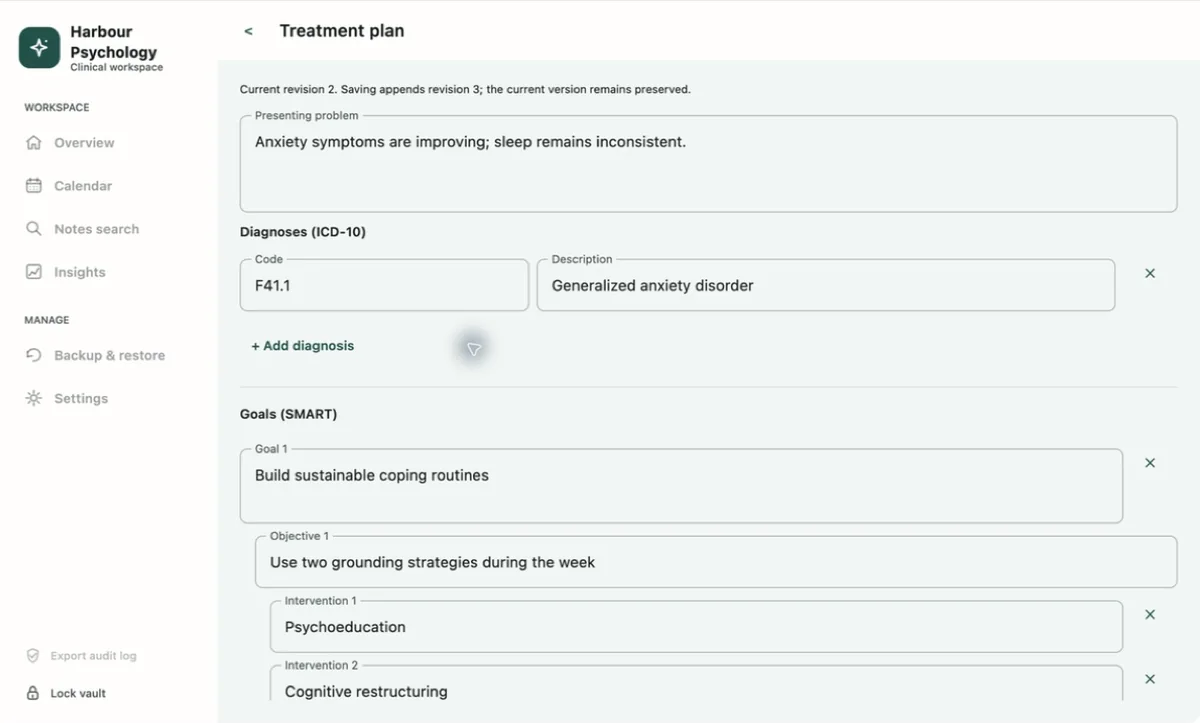
What a treatment plan holds
Once a plan exists, its diagnoses and goals become selectable context inside a progress note — so goal progress and interventions are recorded against the plan you actually wrote, without retyping it and without the note asserting anything the plan does not say.
Safety plans follow the same append-only, reviewable model. A revision is added; nothing is silently replaced.
Intake, ROI and collateral contacts
These sit beside the clinical record and behave the way the rest of the app does — encrypted, guarded against accidental loss, and honest about their limits.
PsyEntry does not manage informed-consent documents, and a signature sketch is not informed consent. An ROI entry stays a tracking draft until a signed authorization is retained in your approved external system. Treat the entry as an index, never as the record of consent.
Searching the vault
Notes search runs against the vault on your disk. It covers note bodies, structured context and finalized history, so a phrase you remember from a session eighteen months ago is findable without opening records one at a time.
There is no remote index and no query leaves the machine, because there is nowhere for it to go. The client directory on the overview has its own search across names and referral sources for the faster “who was that” case.
Practice insights
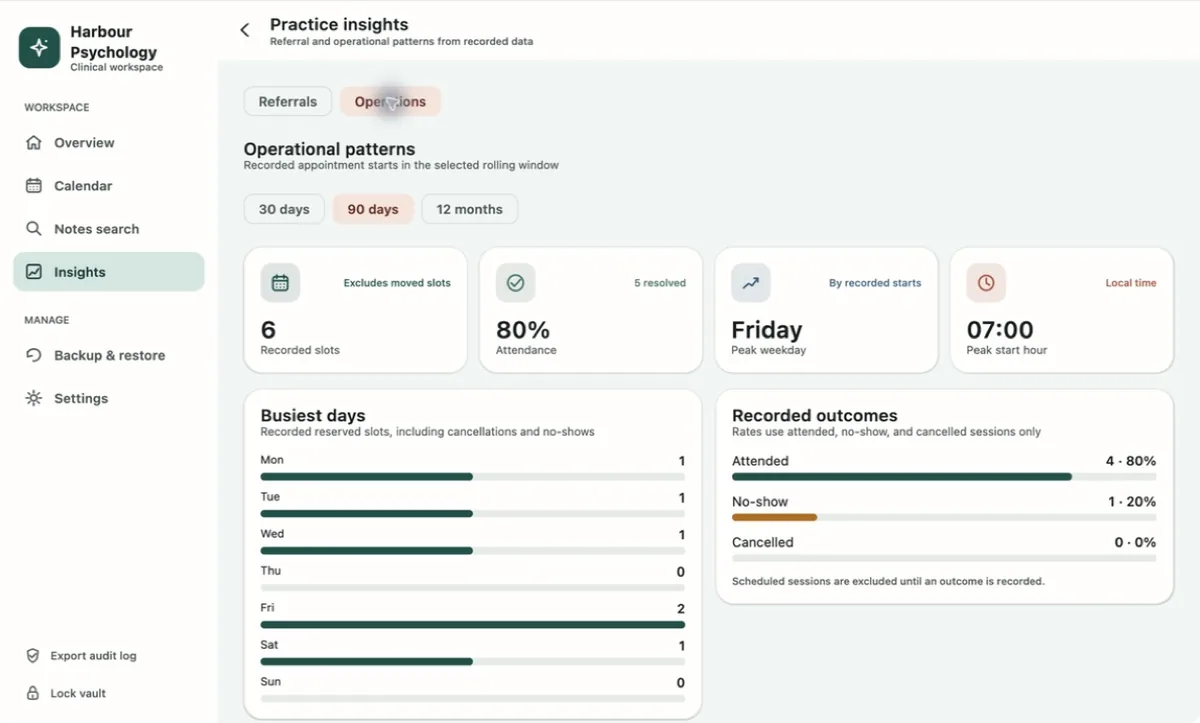
Two tabs, both computed on the device from records you entered. The screen states its own limit at the top: factual counts only, with no inferred conversion and no marketing attribution.
Referrals
Which sources are recorded, how many active clients each accounts for, referral coverage across active records, and the source mix. Consistent wording when you create a client is what makes this useful.
Operations
Recorded appointment starts over a rolling 30-day, 90-day or 12-month window: recorded slots, attendance rate, busiest weekday, peak start hour in local time, and recorded outcomes.
Rates use attended, no-show and cancelled sessions only. A scheduled session with no recorded outcome is excluded entirely rather than being counted as attended. If the numbers look low, the usual cause is outcomes that were never recorded — not sessions that never happened.
Backup and restore
A .psybackup is a complete, passphrase-encrypted snapshot of the vault written to a file you choose. It is the only copy of your records that survives the loss of this Mac, so treat creating and testing one as routine clinical hygiene rather than a chore.
Creating a backup
- Verify firstRun Verify records in Settings before you export. A backup of a vault you have not checked is a backup of an unknown state.
- Export from Backup & restoreChoose a destination through the system save dialog and set a backup passphrase. This is a separate secret from your vault password — deliberately.
- Open it independentlyConfirm the file opens with its passphrase before you rely on it.
- Store it away from the MacEncrypted external media or a location that meets your own retention obligations. Keep the passphrase through whatever secure process you already use for keys.
It is not a merge. PsyEntry decrypts and validates the entire snapshot — audit chain, note revisions, encrypted clinical content, relationships and assessment scoring — and only then replaces records, in a single database transaction. If validation fails, nothing is touched. If it succeeds, whatever was in the destination vault is gone.
While a backup or restore is running, user-directed exit and lock actions are blocked. A security-triggered lock waits for the operation to finish and then becomes the final session state, so the vault is never left half-written.
Verify records
Settings can run the whole-vault verifier on demand. A shorter version of the same check runs automatically before an initialised vault will open at all — if the audit chain is broken, PsyEntry does not open the vault until the integrity problem is resolved.
What it checks
- The audit chain, end to end.
- Note revisions and their hashes.
- Encrypted clinical content.
- Relationships between records.
- Assessment scoring invariants.
Run it before every backup, after every restore, and any time the app has behaved oddly. A broken result names the area that failed — not the record, the path, or the underlying exception. Verification messages omit record details.
Stop entering new records. Do not delete anything. Export a support report from Settings, note the fixed PE-… reference, and get in touch before doing anything else — and keep the most recent known-good backup untouched.
Locking and daily habits
PsyEntry locks itself after 15 minutes idle. Locking discards active key material; unlocking derives access again from your password.
- Lock deliberately between clients. The sidebar action is there for exactly this. Do not rely on the idle timer while someone else is in the room.
- The picker grace period is bounded. When a system save or open dialog is up, PsyEntry grants a two-minute per-invocation grace window so an export is not abandoned mid-flow. Older picker timers cannot extend or prematurely consume a newer one’s window.
- Locking still completes if its audit write fails. An operational logging failure does not leave the vault unlocked.
- An unlocked vault is readable by anything running as you. That is why the OS-level habits in section 01 are not optional extras.
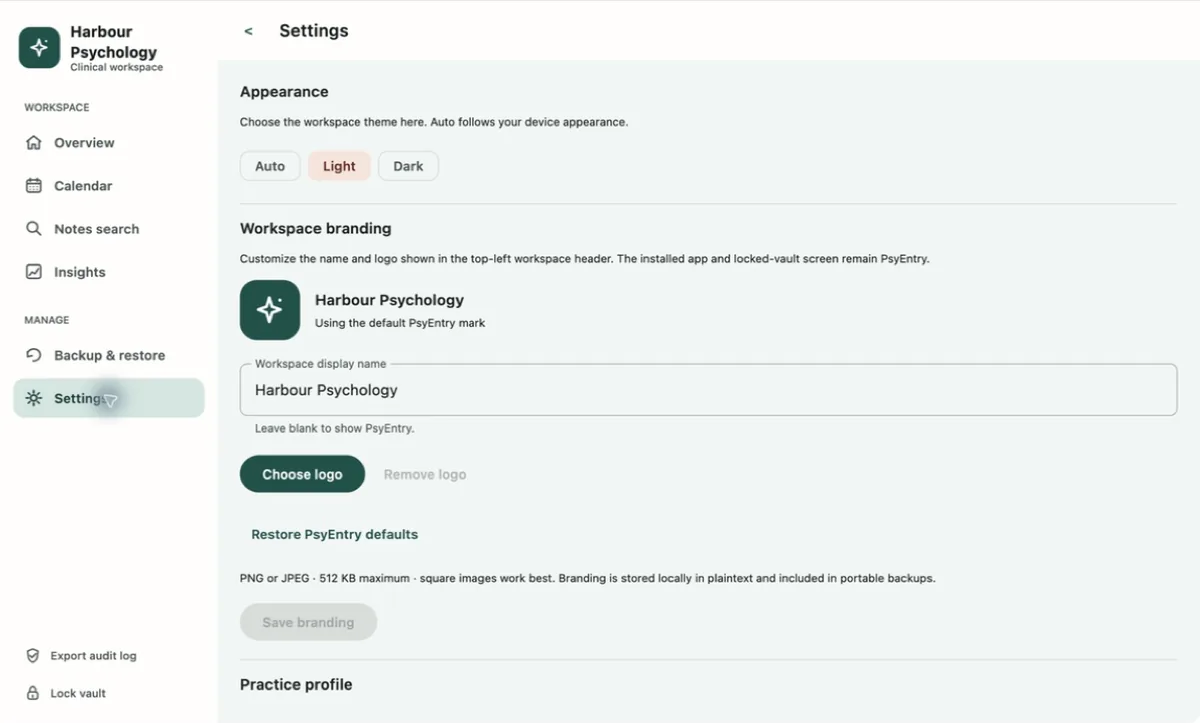
Settings also holds appearance, workspace branding and the practice profile. Branding is stored locally in plaintext and travels inside a portable backup; the installed app and the locked-vault screen stay PsyEntry, so nothing about a practice is implied before the vault is open.
Moving between Macs or editions
There is no sync, so a vault lives on one machine at a time. The direct-download and Mac App Store editions also keep separate live vaults by design — they do not silently share records. The same sequence covers both cases.
- Verify the sourceRun Verify records on the vault you are moving away from.
- Create a fresh backupExport a new .psybackup. Do not reuse an old one.
- Confirm the backup opensIndependently, with its passphrase, before you go further.
- Restore into the destinationInto a newly created destination vault, then restart and unlock with the destination password.
- Verify and sampleRun Verify records again, then open several restored records by hand and check they are what you expect.
- Only then remove the sourceKeep the source vault and the backup until the migration has been independently accepted.
Copying the SQLite file or its WAL files by hand can produce a vault that opens but is subtly wrong. The encrypted backup path exists precisely so that the snapshot is validated as a whole before anything is written.
Uninstalling and data lifecycle
Removing PsyEntry deliberately leaves the vault directory in place on macOS and Windows, so removing the application does not silently destroy a clinical record. Deleting the data is a separate, conscious act.
The psy-notes directory and psy-notes.db filename are retained as compatibility identifiers, so an upgrade opens your existing vault rather than creating an empty one beside it.
Make and independently verify a backup, close the app, and confirm the records are legally eligible for destruction under your own retention obligations. Once the directory is gone there is no copy anywhere else — that is the design.
Troubleshooting
PsyEntry reports routine failures as fixed PE-… support references rather than exception text, so nothing about a record leaks into an error message or a screenshot. Quote the reference when you get in touch.
| What you are seeing | What to do |
|---|---|
| macOS will not open the app, or cannot identify the developer | Stop. Do not bypass the Gatekeeper warning. Re-download only from the Mac App Store listing or the official download page, check the SHA-256, and contact support if it still fails. |
| Windows blocks the app or the publisher is unexpected | Stop. Do not bypass SmartScreen or a signature warning. Install only from the verified Microsoft Store listing linked on the official download page. |
| Forgotten vault password | Unlock with the recovery phrase and set a new password. This works only while that same vault file still exists on the machine. |
| Forgotten recovery phrase, password still known | You are not locked out, but you have lost your second way in. Make a fresh verified backup now, then treat restoring into a new vault as your recovery path. |
| Both secrets lost | The vault is unrecoverable by design — there is no escrow and no backdoor. Your encrypted .psybackup and its own passphrase are the only route back. |
| A screen shows a load failure | Retry from the failure panel. Actions that depend on the missing data stay disabled until it loads, so nothing is created against a half-loaded record. |
| Verification reports a broken area | Stop entering records, do not delete anything, export a support report, and get in touch. Keep your last known-good backup untouched. |
| An export produced no file | Cancelling a save dialog is a normal outcome and is recorded as cancelled, not failed. If you expected a file, check the destination you chose and try again. |
| Attendance figures look too low | Sessions with no recorded outcome are excluded from rates. Record attended, no-show or cancelled on past appointments. |
| Referral figures split one source in two | The count is by exact recorded wording. Normalise the source text on the client records involved. |
| A note you expected is missing | Check the appointment — an unfinalized draft is still a draft. Notes search covers finalized history and structured context. |
| Records missing after switching editions | Expected. The direct and App Store editions keep separate vaults. Follow section 17 to migrate through an encrypted backup. |
Reference
File types
Cryptography, in one place
This release
Verify locally with shasum -a 256 PsyEntry-1.0.0.dmg before you install.
Contacting support
Support cannot inspect your vault and holds no server-side copy of anything, so the whole process is built around information that discloses nothing about a client. Send the minimum that lets someone reproduce the problem.
Support is provided by Ownerstate Software and reviewed as capacity allows; no response-time or emergency-service guarantee is offered.
PsyEntry is documentation software for professionals — not emergency response, monitoring, crisis dispatch or clinical decision support. Use your locally applicable emergency or crisis process.
Still stuck on something?
Send the redacted support report and the steps — nothing about a client needs to travel with it.